
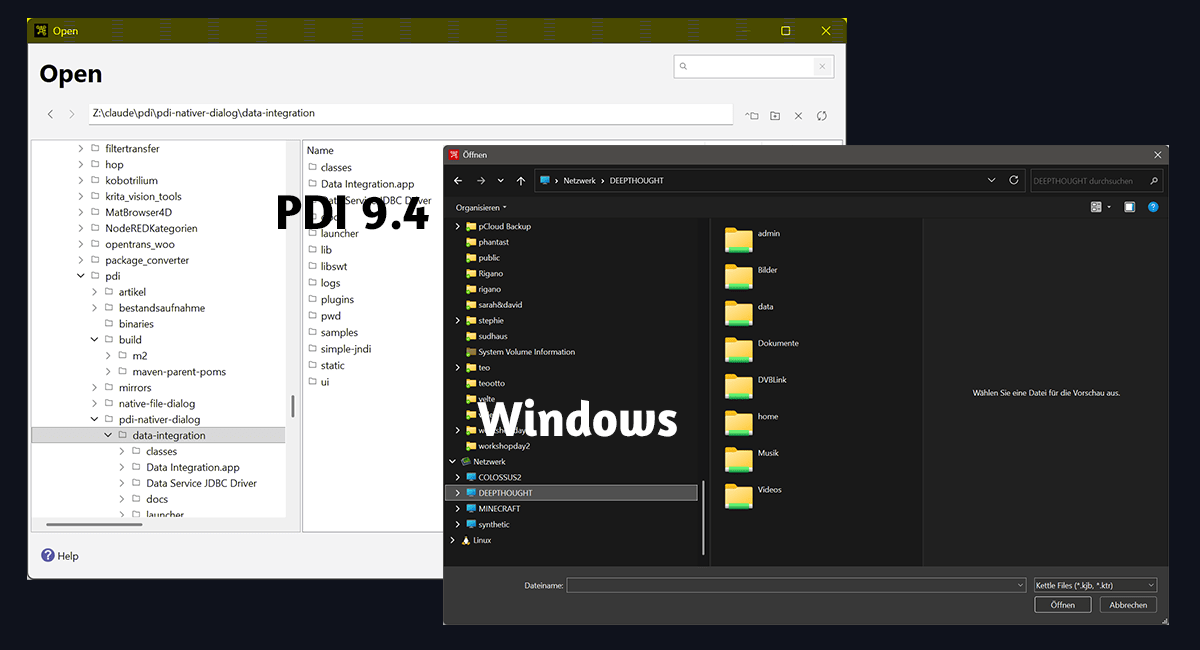
Anyone working with Pentaho Data Integration opens and saves a few dozen files a day. This is exactly where Pentaho put its own file browser starting with version 8. It appears in Spoon when you open a transformation, pick “Save as” or click “Browse” in a step dialog. The dialog is rebuilt in Java and knows nothing about the operating system apart from the drive letters.
The problem: a lot of clicking for very little
The Pentaho dialog shows a tree on the left and a file list on the right. To reach a folder further down you expand one level after another, or you click your way through the list on the right. There is a path field, but it does not behave like the one in Explorer: the dialog walks down the tree levels and selects them one by one, which takes a while with deeply nested paths and on network drives.
What the Windows dialog brings along is missing here: favourites and quick access, the history of recent folders, the usual keyboard shortcuts, network drives and OneDrive the way the system knows them, plus all the small things you get used to over the years. If your projects live in nested directories, every file costs several clicks where the system dialog would have needed two.
What makes this annoying is that Spoon still uses the system dialog, only in other places. In the source of version 9.4 there are around 70 Java files calling SWT’s native dialog, which is the Explorer dialog on Windows and the GTK chooser on Linux. For opening and saving transformations and jobs, Pentaho left that path, and there is no setting to switch back. Spoon’s options say nothing about it, and the 9.4 code contains no switch that restores the old behaviour. I am not aware of any reason that was given for this.
The fix: a small plugin
For these dialogs PDI calls an extension point named SpoonOpenSaveNew, normally served by the bundled file-open-save-new-plugin. Since plugins in PDI can be swapped, that call can be answered by something else without touching PDI itself.
That is what my plugin does. When Spoon starts, it takes the Pentaho dialog out of the call list without uninstalling it, and answers the extension point itself. You get the file dialog of the operating system: the Explorer dialog on Windows, the GTK chooser on Linux, the Cocoa dialog on macOS. The “Tools” menu has a checkbox that switches back to the Pentaho dialog at any time, without restarting Spoon. That switch is needed, because VFS connections to S3 or HDFS and access to a Pentaho repository still go through the Pentaho dialog. The system dialog does not know these sources.
The plugin consists of three Java classes, is licensed under the Apache License 2.0 and only needs one JAR file in the plugins folder. I tested it with PDI 9.4.0.0-343 on Windows 11. Source and JAR are here: https://codeberg.org/xanathon/PDI_OS_Save_Dialog
Hitachi Vantara is wiping PDI’s Community Edition off the web
Building a plugin like this shows quickly what state the PDI Community Edition is in. To compile it you need the JAR files of an existing installation, because PDI cannot be built from source any more. The source itself is still public on GitHub, the pentaho-kettle repository is active and carries tags up to 11.1 from May 2026. What you cannot get are the parts it is built from. All Pentaho POMs pull their dependencies from Pentaho’s own Maven repository, and that repository is closed: the address repo.orl.eng.hitachivantara.com used in the 9.4 POMs no longer exists, and the current address repo.pentaho.com requires a login. Every request there ends in HTTP 401, including requests for 9.4 artifacts. On top of that some Pentaho build plugins are missing entirely, among them the license-helper-maven-plugin that runs for every module. Ready-made CE packages are gone as well: the Pentaho project on SourceForge, which distributed the Community Edition for years, today holds exactly one file, a PDF from January 2025. Anyone still needing PDI 9.4 finds it on private mirrors.
In terms of licensing this is perfectly fine, and that is the uncomfortable part. The Apache License 2.0 obliges nobody to keep publishing source code or build infrastructure. The 9.4 code stays Apache licensed, and whatever Hitachi Vantara develops after that may stay behind a paywall. Pentaho is still marketed on the good name of an open source project while the return for that name is disappearing. The community supplied plugins, documentation and forum answers for years and is now looking at a version it can no longer build itself. A large part of that work is vanishing from the web as well. The old wiki at wiki.pentaho.com only returns an error, forums.pentaho.com redirects to the pentaho.com front page, and help.pentaho.com refuses access (checked in September 2026). Guides and forum threads that were linked for years are gone, and in many cases they were the only documentation for a step or an error message. This is not neglect. A company that no longer wants to maintain a Community Edition can leave it alone and let the community carry on. Shutting down a Maven server, withholding build plugins and pulling wiki, forum and manuals off the web are active steps. The result is a CE that can no longer be built and whose documentation is missing. Making the free product unusable creates demand for the paid one.
In practice this means two things. First, keep a copy of the binary and the matching sources of the version you run, while both are still reachable. Second, it is worth looking at Apache Hop, the fork of the project that lives at the Apache Software Foundation and pulls its dependencies from public repositories. Hop has its own quirks in day to day use, and quite a few of its UX decisions stray from common standards in ways I find questionable, which is a topic for another article. The same goes for my experience with the Hop developers, who react to feature requests and bug reports somewhat … harshly at times.
Sources
- Plugin, source and JAR: https://codeberg.org/xanathon/PDI_OS_Save_Dialog
- PDI 9.4.0.0-343 source: https://github.com/pentaho/pentaho-kettle/tree/9.4.0.0-343
- extension point
SpoonOpenSaveNew:core/src/main/java/org/pentaho/di/core/extension/KettleExtensionPoint.java, called fromui/src/main/java/org/pentaho/di/ui/spoon/Spoon.javaandui/src/main/java/org/pentaho/di/ui/core/events/dialog/SelectionAdapterFileDialog.java - Pentaho file browser:
plugins/file-open-save-new/
- extension point
- Hitachi Vantara’s Maven repository, set as the property
pentaho.resolve.repo: https://github.com/pentaho/maven-parent-poms/blob/9.4.0.0-343/pom.xml. The hostrepo.orl.eng.hitachivantara.comdid not resolve on 2026-09-17. - No longer reachable, checked on 2026-09-17:
wiki.pentaho.com(HTTP 530),forums.pentaho.com(redirect topentaho.com),help.pentaho.com(HTTP 403) - Pentaho’s current artifact repository: https://repo.pentaho.com/artifactory/pnt-mvn/ – on 2026-09-17 every request returned HTTP 401, including requests for 9.4 artifacts. It is set as
pentaho.resolve.repoin https://github.com/pentaho/maven-parent-poms/blob/11.1.0.0-410/pom.xml - The Pentaho project on SourceForge, formerly the distribution channel for the CE, on 2026-09-17 with exactly one file (Pentaho.pdf, January 2025): https://sourceforge.net/projects/pentaho/files/
- PDI 9.4 on a community mirror, not an official source: https://github.com/ambientelivre/legacy-pentaho-ce/releases
- Apache License 2.0: https://www.apache.org/licenses/LICENSE-2.0
- Apache Hop: https://hop.apache.org and https://github.com/apache/hop